Article
Incident Reporting Decision Tree for DD Providers
What's a Level I, what's a Level II, what triggers state notification, and what triggers an RCA — the decision tree that gets it right every time.

CareHub by DSPlife
·3 min read
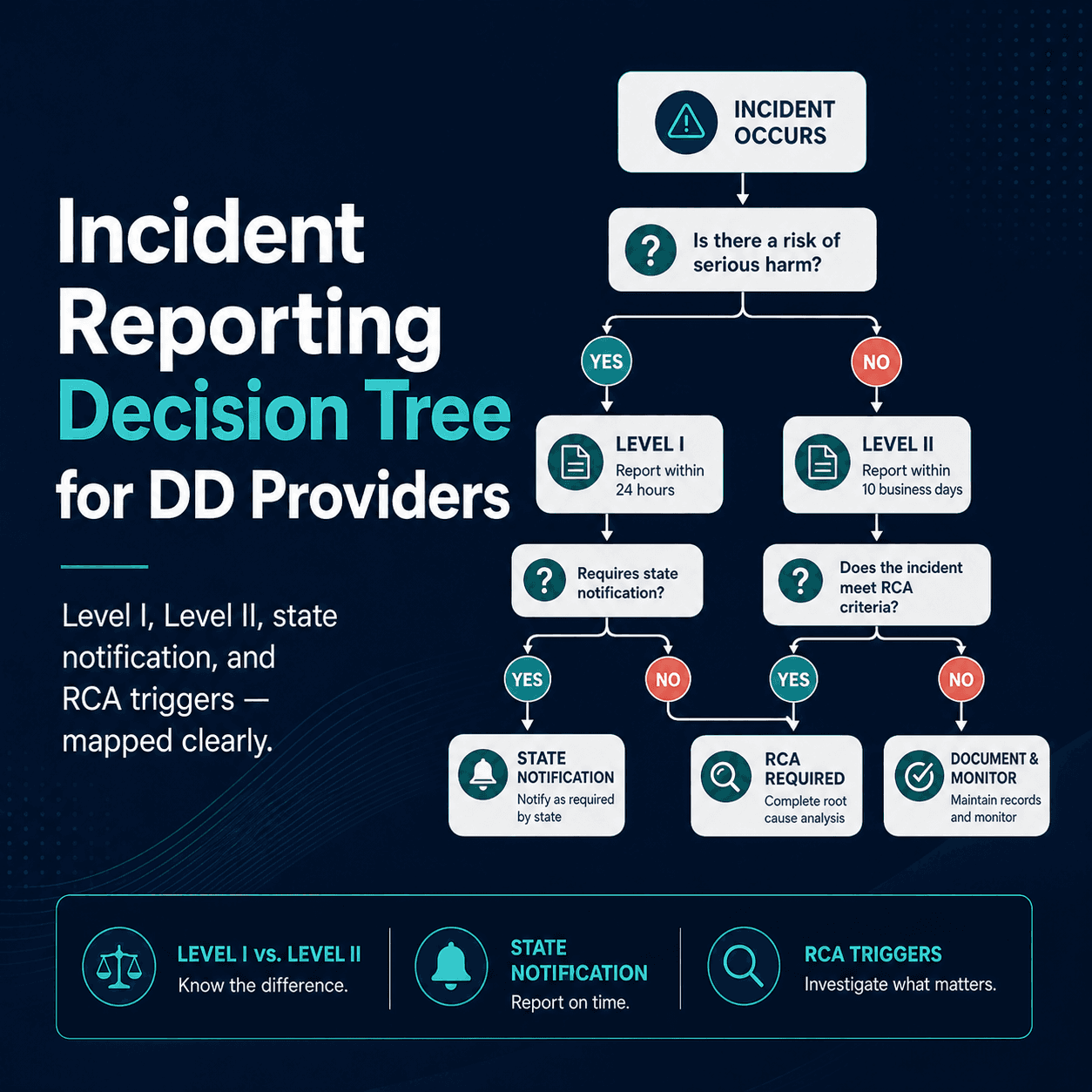
The single biggest source of incident-reporting citations is misclassification. A Level III gets logged as a Level II. A reportable event never makes it to the state portal. An RCA-triggering incident gets a brief note and no follow-up. None of these are bad-faith errors — they're decision-tree failures.
Here is the decision tree your team should be running on every incident.
Step 1: Did anyone get hurt or could anyone have been hurt?
If yes, an incident report is required. If no, but something unusual happened that could have led to harm under different circumstances, an incident report is still required (these are sometimes called "near misses" or "Level I" depending on your state).
Step 2: Classify severity
Each state uses slightly different categories, but the universal pattern:
- Level I / minor: No injury, no property damage above minimal, no service interruption. Example: individual refused a meal but ate later; staff verbally redirected an individual who started to leave the home.
- Level II / moderate: Minor injury treated on-site, modest property damage, brief service interruption, behavioral incident requiring physical intervention without injury. Example: individual fell, scraped knee, treated with first aid; staff used approved physical management to prevent self-harm.
- Level III / major: Death, serious injury requiring medical treatment beyond first aid, hospitalization, allegation of abuse/neglect/exploitation, missing person, criminal arrest, medication error with adverse outcome, suicide attempt, sexual assault. Example: individual fell and required ER for stitches; staff witnessed financial exploitation by a family member.
Step 3: State reporting timeline
Level III almost always triggers state reporting:
- Virginia DBHDS: Serious incident report within 24 hours via DBHDS portal
- North Carolina DHHS: Level III incident report within 24 hours via IRIS
- Texas HHSC/DFPS: Reportable event within 24 hours via DFPS or HHSC depending on type
- Ohio DODD: MUI within 4 hours via MUI/UI online system
Level II events are usually internally documented and reviewed by your CQI committee, but check your state's specific definitions — Ohio in particular has a long list of events that look like Level II but qualify as MUIs.
Step 4: Does this trigger an RCA?
An RCA is required for:
- Any death
- Any Level III / major incident
- A pattern of related Level II incidents (typically 3+ in 90 days)
- Any incident your CQI committee flags
If yes, the RCA is on the QIDP supervisor or CQI chair's plate within the timeframe in your state regs (typically 30 days).
Step 5: Who needs to know?
For every incident, regardless of level:
- The individual's case manager / SSA / SC
- The individual's family / guardian (if applicable)
- The individual themselves, in language they understand
- The QIDP / SSA on record
- Your CQI committee (at the next meeting)
For Level III, add:
- State licensing
- Adult Protective Services (if abuse/neglect/exploitation suspected)
- Law enforcement (if criminal)
- The provider's medical director (if health-related)
The most common reporting failures
- Documenting an event but never deciding the level. A note that says "incident occurred, will follow up" with no severity assigned is a citation.
- Notifying internally but skipping state reporting. Provider knew the family, knew the case manager, never logged in to the state portal.
- Late notifications. Even an hour past the 4-hour MUI window in Ohio is reportable as a separate finding.
- No CQI review. Incident logged, never made it to the CQI agenda.
- No RCA on a Level III. Incident reported to the state, internally noted, but no RCA on file at audit time.
Where CareHub fits
CareHub's incident module walks the DSP through the decision tree at the time of entry: classifies severity from the answers given, surfaces the state-reporting requirement automatically, opens the RCA form when triggered, queues the incident for the next CQI meeting, and tracks notification to all required parties with timestamps.
Start a free 14-day trial — or download our incident-reporting decision tree as a printable PDF for the staff bulletin board.
Share this article
Help another DD-waiver provider find this.
One short, useful email per week
State regulatory bulletins, customer wins from real DD-waiver providers, a free resource in each issue. One-click unsubscribe.
Keep Reading
More from the CareHub blog
Article
The MAR Errors That Fail a DBHDS Medication Audit (and How to Prevent Them)
The Medication Administration Record is the second thing a DBHDS surveyor pulls after daily notes. Here are the MAR mistakes that draw citations — blank boxes, PRN follow-ups, controlled-count gaps, undocumented refusals — and how to close them before your annual review.
Read articleArticle
Choosing an IDD EHR: The Buyer's Checklist
Most IDD EHR demos look the same for the first twenty minutes. Here is the checklist that surfaces the differences that actually matter — pricing model, what's included, compliance depth, migration, and audit-readiness.
Read articleArticle
ISP Part V (Plan for Supports), Section by Section
The Part V / Plan for Supports is the operational heart of the ISP — the part staff actually document against. Here is what belongs in each section, and what a reviewer checks when they read it.
Read article